支持约30种开发语言,多种开发平台,且分发免费的图表报表生成控件。
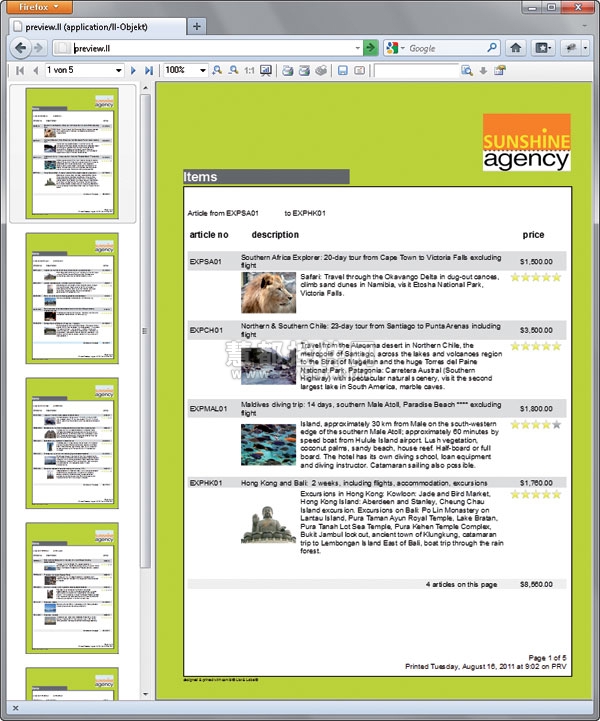
List & Label是一款功能强大的图表报表控件,支持多种开发平台且分发免费。通过List & Label报表生成器,开发人员只需添加数行代码便可在他们的程序中添加报表,子报表,简单列表,多表单,交叉表,图表,表格,标签,打印,预览,导出以及Web报表。
适用范围:.NET、Java、Delphi、C#、C/C++、C++ Builder、Visual Basic、Visual C++等平台的报表、图表、仪表盘、条码的生成。
With the report generator List & Label, software developers need only a few lines of code to equip their own applications with reports, forms, lists, diagrams, labels, serial mails, export functionalities etc.
 List & Label 19-为软件开发者们提供的强大报表工具
List & Label报表组件的应用领域
用户只需添加数行代码即可为其应用程序增强功能,可包含以下功能:报表,子报表,简单列表,多表单,交叉表,图表,表格,标签,打印,预览,导出以及Web报表。
不同版本以适应不同需求
企业版:包含支持与订阅,web服务器授权等
专业版:包含支持以及订阅
标准版:包含终端用户设计器,不包含支持
免费版:不包含设计器,输出中包含水印,仅支持英文
List & Label 19特性
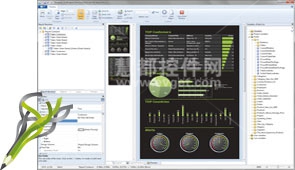 | 面对终端用户的设计器设计器支持免费重新分配,你可以将其部署到任何应用中,以报告、子报表、列表、多表格、列联表、图形、图表、根特图表、计量表、表格、标签、邮件合并、条形码和web报表的形式向终端用户提供直观的输出显示。设计器也能完美集成到任何应用程序,支持Windows 2000到最新版本的多种操作系统。 |
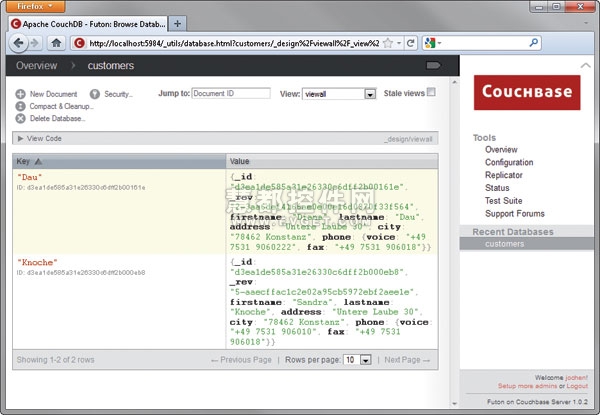
轻松链接到数据源你可以将数据字段和数据库字段,包括列表和标签,组合成一个封装组件或者DLL,使用数据绑定,选择脱离数据库工作模式,或者将设计器放置在一个单独控件中。甚至无需任何代码,你就可以通过智能标签链接直接从.NET开发环境启动设计器。此报表工具支持广泛的数据源,包括SQL、Oracle、XML、LINQ和NoAQL。而且你可以轻松地结合多个数据源,例如SQL数据、业务对象和CSV数据。 | 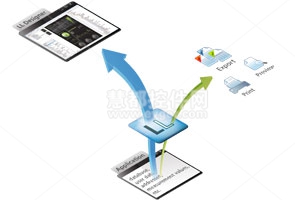 |
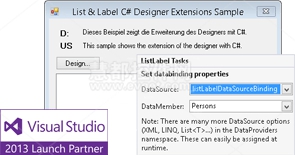 | 开发环境选择使用List & Label你可以自由地选择开发环境。你可以为项目选择最合适的语言,如NET、Visual Studio、C#、C/C++、Delphi等等 |
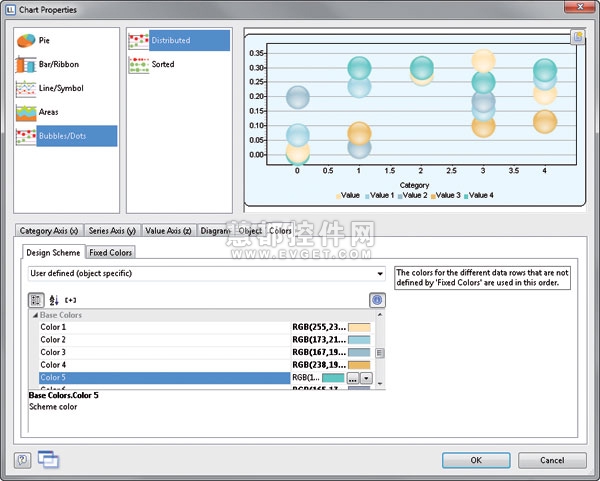
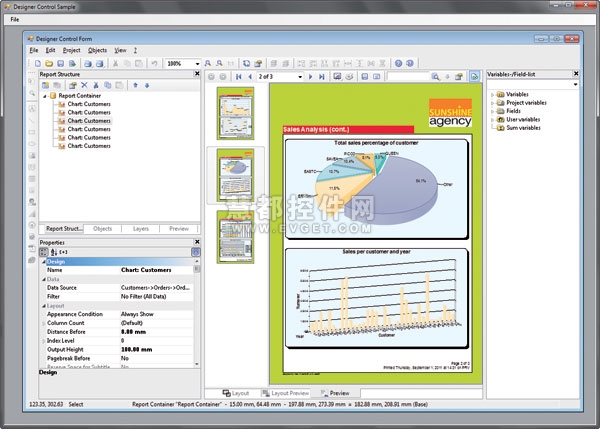
精美的报表该报表生成器以最小的编程点集成到软件中,提供专业水平的列联表、列表和报表。用户可以采用多种图表和计量表来提高报表的视觉效果。List & Label还支持表格、标签等进行批量打印,而无需文字处理工具。 |  |
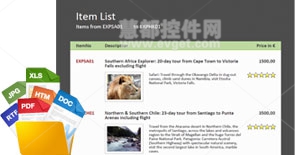
| 配置方法简单由于支持xcopy,List & Label很容易集成到应用中,无需特殊的数据库驱动和安装要求。也可以很容易地复制到你需要使用的地方,内存占用很小。开发人员很喜欢这个简单的过程—甚至不需要注册(除非你使用OCX),即使出现小故障,完整的自动调试功能也可以很快解决它。 |
易于部署通过完整的API,你可以添加、移除和修改序列以及点,或者创建图表后随时修改坐标轴。大量的事件为图表编程提供了钩子函数。结合jQuery、MooTools或原型的Ajax API,他们对解决方案是开放的,就像不断更新来自服务器、用户数据源的属性值的动态图表。 | 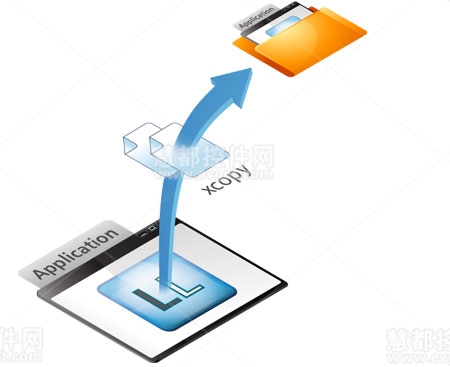 |
是什么让List & Label报表工具与众不同?
标准版,专业版以及企业版中均包含了终端用户设计器 有了List & Label Report Designer,用户即可快速便捷的为其应用程序增加一些强大的功能。用户无需为之支付后续费用即可在大部分的桌面应用程序之间传递使用,其企业版还包含了用于服务器的运行时授权。 | 
List & Label设计器提供你想要的一切功能。 |
灵活性与全局控制 |
广受赞誉
List & Label已经过17年的不停完善和更新,目前已经拥有全球众多忠实的客户,并在业界多次获得好评。
快速集成
总共只需五分钟,共计三步即可在.NET中完成:将组件拖曳至窗体中;设置智能标签属性;开始打印或设计。
易于再发布
终端用户无需安装数据库驱动,分发非常简单,且安装包相当方便快捷,甚至只需要20MB的存储空间即可!
选择开发环境
改变编程语言以适应开发者的项目—这压根就不是问题!其支持诸如.NET, Visual Studio, C#, C/C++, Delphi等其他编程语言。
来自德国厂商的技术支持
我们软件优异的性能来自于强大的软件开发团队,用户可快速的得到技术支持响应。
为软件开发者而生的强大报表
List & Label有别于当前市面上已存在的任何报表生成器,因为在设计之初,我们就全心关注于什么才是开发者们最需要的。所以这是一个真正意义上的开发工具!
节省时间 在集成时 在发布时 在开发者开发时,终端用户在使用报表功能时
体积较小 节省资金 | | 
List & Label 设计器提供你想要的一切功能,且广泛应用于报表,图表和标签等。 |
应用领域
报表,列表,交叉表,包括多重数据表,主从表/主次表以及其他所有对象类型的组合,比如表格中的图表等。
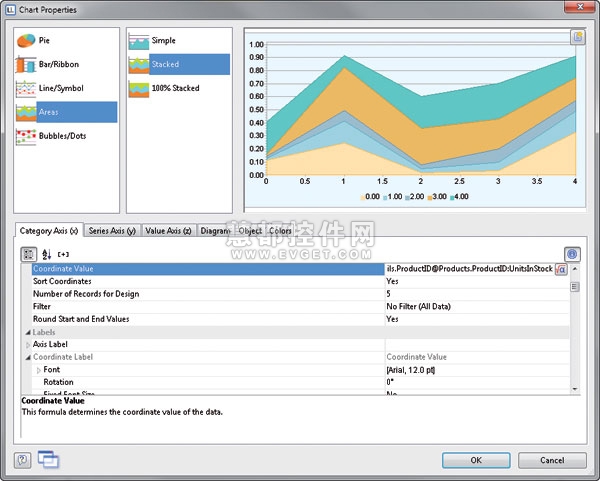
图表,单一图表和与报表结合的图表。
表单和文件卡:准确的获取结果,比如,使用扫描原件。
交互式表单使得终端用户可以在打印预览中进行输入。
标签,包括条形码以及图像,其提供了多达40余种条形码格式,以及超过2000余种国际化的标签模板,用户可根据自己喜好设计大小。
使用RTF对象合并邮件。用户可以将之作为一个控件集成入对话框中,将之作为一个小的文字处理器使用。
导出与转化:PDF, HTML, RTF, Excel, MHTML, XML, JPEG, GIF, BMP, EMF, TIFF, Multi-TIFF, CSV, TTY, WMF, PCX, PNG, PCD, DIB, RLE等等。
实用原则
传统桌面应用程序::
数据库(用户的应用程序将数据传送至List & Label)或者通过.NET, Delphi, C++ Builder完成数据绑定.
 | | 服务器或者Web服务器应用程序:
用户仅需在起Web应用程序中计划设置一个接口以创建报表。在企业版中我们提供了为服务器和web服务器应用程序定制的无限制运行时授权!
 |
Web Reporting示例
下面是如何使用combit List & Label网页报表的示例。
>>Web Reporting Demo
编程实例
Starting the Designer
.NET
protected void button1_Click (object sender, System.EventArgs e)
{
try
{
// Bind to a DataSet object
LL.SetDataBinding(myDataSet, "Orders");
// Set Properties
LL.AutoDesignerFile = "subreport.lst";
LL.AutoProjectType = LlProject.List;
LL.AutoDialogTitle = "Sample";
LL.AutoShowSelectFile = true;
// Call the Designer
LL.Design();
}
// Catch Exceptions:
catch (Exception LlException)
{
MessageBox.Show("Information: " +
LlException.Message,"Information",
MessageBox.IconInformation | MessageBox.OK);
}
}
Delphi
{Start the Designer}
procedure TForm1.DesignButtonClick(Sender: TObject);
begin
//Assign data source
LL.DataSource := dsCustomers;
//Pass customer data as fields
LL.AutoMasterMode := mmAsFields;
//Set the default project name
LL.AutoDesignerFile := 'subrep.lst';
//Switch print mode to preview
LL.AutoDestination := adPreview;
//Call Designer
LL.AutoDesign('Invoice List', '');
end;
C++
// Define special fields
normal text field:
LlDefineFieldExt(job, "Text", "Testtext",LL_TEXT, NULL);
// Footer field, i.e. numeric:
LlDefineFieldExt(job, "Subtotal", "12.34",
LL_NUMERIC | LL_TABLE_FOOTERFIELD, NULL);
// Barcode field:
LlDefineFieldExt(job, "BC_EAN_128", "123456789abcd",
LL_BARCODE_EAN128, NULL);
// Variable graphics by file name:
LlDefineFieldExt(job, "Regular Graphic","sunny.bmp",
LL_DRAWING, NULL);
// File open dialog with sketch:
LlSelectFileDlgTitleEx(job, hWnd, "File open",
LL_PROJECT_LIST, szFile,sizeof(szFile), NULL);
// Remove a certain menu command from the Designer:
LlDesignerProhibitAction(job, 211);
// Start the Designer with the above fields:
LlDefineLayout(job, hWnd, "Title", LL_PROJECT_LIST, szFile);
Visual Basic
Private SubButtonDesign_Click()
'Start the Designer with the title "Invoice" and the file "invoice.rpt":
ListLabel1.Design(0, hWnd, "Invoice", LL_PROJECT_LIST, "invoice.rpt", 1)
End Sub
For data definition the event ListLabel1_CmndDefineFields is used.
Programming Examples Printing
.NET
private void button2_Click(object sender, System.EventArgs e)
{
try
{
// Bind to a DataSet object
LL.SetDataBinding(myDataSet, "Orders");
// Set Properties
LL.AutoDesignerFile = "subreport.lst";
LL.AutoProjectType = LlProject.List;
LL.AutoDialogTitle = "Example";
LL.AutoShowSelectFile = true;
// Start Print
LL.Print();
}
// Catch Exceptions:
catch (Exception LlException)
{
MessageBox.Show("Information: " +
LlException.Message,"Information",
MessageBox.IconInformation | MessageBox.OK);
}
}
Delphi
{Printing}
procedure TForm1.PrintButtonClick(Sender: TObject);
begin
//Assign data source
LL.DataSource := dsCustomers;
//Pass customer data as fields
LL.AutoMasterMode := mmAsFields;
//Set the default project name
LL.AutoDesignerFile := 'subrep.lst';
//Switch print mode to preview
LL.AutoDestination := adPreview;
//Print
LL.AutoDesign('Invoice List', ,);
end;
C++
//=====================================
void CMainFrame::DoLabelPrint()
//=====================================
{
// Define special fields, regular text field:
LLDefineFieldExt(job, "Text", "Testtext",LL_TEXT, NULL);
// Numeric field:
LLDefineVariableExt(job, "Subtotal", "12.34",
LL_NUMERIC | LL_NUMERIC, NULL);
// Barcode field:
LLDefineVariableExt(job, "BC_EAN_128", "123456789abcd",
LL_BARCODE_EAN128, NULL);
// Variable graphic by file name:
LLDefineVariableExt(job, "Graphic","sunny.bmp", LL_DRAWING, NULL);
// Start printing:
LlPrintWithBoxStart(job, LL_PROJECT_LABEL, szFile,
LL_PRINT_EXPORT, LL_BOXTYPE_BRIDGEMETER, hWnd, "Printing...");
//Print label:
nErrorValue = LlPrint(job);
// End printing:
LlPrintEnd(job,0);
}
Visual Basic
Private Sub ButtonPrint_Click()
'Print the project "test.rpt" on the printer:
Data1.Recordset.MoveFirst
ListLabel1.Print(0, LL_PROJECT_LIST, "test.lst",_
True, LL_PRINT_NORMAL,_
LL_BOXTYPE_NORMALWAIT, hWnd,_
"Print, True, Environ$("temp"))
End Sub
Private Sub ListLabel1_CmndDefineFields(ByVal nUserData As Long,
ByVal bDummy As Long, nProgressInPerc As Long, pbLastRec As Long)
'This event is called by the commands Print and Design.
'It is called for each record to declare the fields and
'their contents to List & Label.
'Repeat for all fields of a 'record:
For i = 0 To Form1.Data1.Recordset.Fields.Count - 1
content$ = Data1.Recordset.Fields(i)
nRet = ListLabel1.LlDefineFieldExt _
(Data1.Recordset.Fields(i).Name,_
content$, LL_TEXT)
Next i
'Skip to next record:
Form1.Data1.Recordset.MoveNext
'Stop printing of last record is reached:
If Form1.Data1.Recordset.EOF = True Then
pbLastRec = 1
End If
End Sub
List & Label's媒体评论
下面是媒体对List & Label评价的部分列举。
| dotnetpro magazine 03/2011 "List & Label has got what it takes to replace reporting component Crystal Reports in Visual Studio. Practically speaking, List & Label shouldn't be missing in any tool collection ..."
“Conclusion: Working with List & Label is fun both for developers and users of applications.”
" List & Label offers extensive graphic functionalities for report generation..."
"combit supports developers by offering extensive documentation, trainings and a broad range of source code examples."
"Thanks to List & Label, target applications get a professional look and feel ..." |
| PC Magazin 3/10 "Test result: very good"
"List & Label is a well engineered auxiliary tool for developers (...)"
"Result: List & Label presents itself up to date and already supports Visual Studio 2010. (...) Special goody: the Professional and Enterprise Edition include a 64-Bit version which has only slightly less functions in comparison to the 32-Bit version and makes the full RAM accessible." |
| PC Magazin 01/09 Rating: "very good"
"List & Label is the most important develoment tool made in Germany due to its excellent product support, it's continuous perfective maintenance and further development." |
| dotnetpro magazine Reader's Choice Award 2008: "Best Component"
Readers of the German "dotnetpro" magazine elected List & Label to be the best component 2008! |
| database pro 06/08 "Data presentation de luxe"
„List & Label has for years been among the most important components in the domain of programming." |
| dot.net magazine Reader's Choice Award 2008: "Best Reporting-Tool"
Readers of "dot.net magazin" have voted for our report generator List & Label to be the winner of its category for the 4th time in a row! |
| PC Magazin 02/08 Test result: "Top product, Rating: very good"
"List & Label 13 was made with much love and makes the developers work easier ..." |
| dotnetpro magazine Reader's Choice Award 2007: "Best Component"
The readers of the German "dotnetpro" magazine elected List & Label as winner in the category "Component" |
List & Label 16 - 100% Reporting Power for Software Developers
Areas of use for the reporting component List & Label
You can enhance your applications by adding only a few lines of code to include all types of evaluations: reports, subreports, simple lists, multi-tables, crosstabs, charts, forms, labels, printing, preview, export and web reporting.
An Edition to Suit Any Requirement
Enterprise Edition: Includes support and subscription, web server licenses etc.
Professional Edition: Includes support and subscription.
Standard Edition: Designer for end user included, support not included.
Free Edition: Designer not included, watermark on printouts, English only.
What Makes The Reporting Tool List & Label Special?
|
Designer for end users included in Standard, Professional and Enterprise Edition
With the List & Label Report Designer you can quickly and easily enhance your application with powerful features. It can be passed on with most desktop applications without paying any further royalty fees. The Enterprise Edition includes runtime licenses for server / web server applications.
|
The List & Label Designer offers everything the developers heart desires.
|
Flexibility and total control
Custom data fields and database fields can be combined as you prefer. Choose freely between component or DLL, data binding or independent from database.
Multiple awards
List & Label has been available for over 17 years. There are many enthusiastic customers and press reviews worldwide.
Fast integration
Apply in 3 steps taking only 5 minutes with .NET: Drag component to form. Set properties using smart tags. Start printing / design.
Easy to redistribute
No installation of database drivers at the end user. Redistributing is dead easy and the package is so handy. Only about 20 MB necessary!
Choose developing environment
Change the language to suit your project - it´s no problem at all! E.g. .NET, Visual Studio, C#, C/C++, Delphi and many other programming languages!
Support from the German manufacturer
Performance and quality of our software products results from the solid knowledge of our software engineers. You benefit from fast support.
Reporting for Software Developers
List & Label is different to all the report generators you know. We concentrate on what's important for you as a developer. You are getting a real development tool.
|
Save time
-
while implementing
-
during the output
-
You save time when developing, your end users save time when using the reporting functions.
Slim
-
Doesn't bloat your application, redistribution is easy
-
Easy on your resources because processed pages are transferred directly to the Windows spooling mechanism without detour.
Save money
-
No further royalties for the Designer's implementation in most desktop applications
-
Considerable value for your applications' end users – with only a few lines of code
|
The List & Label Designer offers everything a „reporter‘s heart“ desires and can be universally applied for reports, charts, labels & co.
|
Areas of Application
-
Reports, lists, crosstabs , including multi-tables, master detail / sub-reports and combinations with all other object types, e.g. charts in tables.
-
Charts , solo and combined with reports.
-
Forms and file cards: exact results achieved, for instance, by using scanned originals in the background.
-
Interactive forms enable end user input within the print preview.
-
Labels incl. barcodes and graphics. Over 40 barcode formats and more than 2000 international label templates are available, or design the size as you wish.
-
Mail merges using the RTF object. You can also integrate it as a control into your dialogs and use it as a small word processor.
-
Export and conversion : PDF, HTML, RTF, Excel, MHTML, XML, JPEG, GIF, BMP, EMF, TIFF, Multi-TIFF, CSV, TTY, WMF, PCX, PNG, PCD, DIB, RLE...
Functional Principle
Classic Desktop Application:
of database (your application transfers data to List & Label) or with .NET, Delphi, C++ Builder via data binding.
|
Server or web server application:
you only need to plan an interface in your web application to create reports. Unlimited runtime license for server and web server application included in Enterprise Edition!
|
Web Reporting Demo
The following Website demonstrates how to use combit List & Label for web reporting.
>>Web Reporting Demo
Programming Examples
Starting the Designer
.NET
protected void button1_Click (object sender, System.EventArgs e)
{
try
{
// Bind to a DataSet object
LL.SetDataBinding(myDataSet, "Orders");
// Set Properties
LL.AutoDesignerFile = "subreport.lst";
LL.AutoProjectType = LlProject.List;
LL.AutoDialogTitle = "Sample";
LL.AutoShowSelectFile = true;
// Call the Designer
LL.Design();
}
// Catch Exceptions:
catch (Exception LlException)
{
MessageBox.Show("Information: " +
LlException.Message,"Information",
MessageBox.IconInformation | MessageBox.OK);
}
}
Delphi
{Start the Designer}
procedure TForm1.DesignButtonClick(Sender: TObject);
begin
//Assign data source
LL.DataSource := dsCustomers;
//Pass customer data as fields
LL.AutoMasterMode := mmAsFields;
//Set the default project name
LL.AutoDesignerFile := 'subrep.lst';
//Switch print mode to preview
LL.AutoDestination := adPreview;
//Call Designer
LL.AutoDesign('Invoice List', '');
end;
C++
// Define special fields
normal text field:
LlDefineFieldExt(job, "Text", "Testtext",LL_TEXT, NULL);
// Footer field, i.e. numeric:
LlDefineFieldExt(job, "Subtotal", "12.34",
LL_NUMERIC | LL_TABLE_FOOTERFIELD, NULL);
// Barcode field:
LlDefineFieldExt(job, "BC_EAN_128", "123456789abcd",
LL_BARCODE_EAN128, NULL);
// Variable graphics by file name:
LlDefineFieldExt(job, "Regular Graphic","sunny.bmp",
LL_DRAWING, NULL);
// File open dialog with sketch:
LlSelectFileDlgTitleEx(job, hWnd, "File open",
LL_PROJECT_LIST, szFile,sizeof(szFile), NULL);
// Remove a certain menu command from the Designer:
LlDesignerProhibitAction(job, 211);
// Start the Designer with the above fields:
LlDefineLayout(job, hWnd, "Title", LL_PROJECT_LIST, szFile);
Visual Basic
Private SubButtonDesign_Click()
'Start the Designer with the title "Invoice" and the file "invoice.rpt":
ListLabel1.Design(0, hWnd, "Invoice", LL_PROJECT_LIST, "invoice.rpt", 1)
End Sub
For data definition the event ListLabel1_CmndDefineFields is used.
Programming Examples Printing
.NET
private void button2_Click(object sender, System.EventArgs e)
{
try
{
// Bind to a DataSet object
LL.SetDataBinding(myDataSet, "Orders");
// Set Properties
LL.AutoDesignerFile = "subreport.lst";
LL.AutoProjectType = LlProject.List;
LL.AutoDialogTitle = "Example";
LL.AutoShowSelectFile = true;
// Start Print
LL.Print();
}
// Catch Exceptions:
catch (Exception LlException)
{
MessageBox.Show("Information: " +
LlException.Message,"Information",
MessageBox.IconInformation | MessageBox.OK);
}
}
Delphi
{Printing}
procedure TForm1.PrintButtonClick(Sender: TObject);
begin
//Assign data source
LL.DataSource := dsCustomers;
//Pass customer data as fields
LL.AutoMasterMode := mmAsFields;
//Set the default project name
LL.AutoDesignerFile := 'subrep.lst';
//Switch print mode to preview
LL.AutoDestination := adPreview;
//Print
LL.AutoDesign('Invoice List', ,);
end;
C++
//=====================================
void CMainFrame::DoLabelPrint()
//=====================================
{
// Define special fields, regular text field:
LLDefineFieldExt(job, "Text", "Testtext",LL_TEXT, NULL);
// Numeric field:
LLDefineVariableExt(job, "Subtotal", "12.34",
LL_NUMERIC | LL_NUMERIC, NULL);
// Barcode field:
LLDefineVariableExt(job, "BC_EAN_128", "123456789abcd",
LL_BARCODE_EAN128, NULL);
// Variable graphic by file name:
LLDefineVariableExt(job, "Graphic","sunny.bmp", LL_DRAWING, NULL);
// Start printing:
LlPrintWithBoxStart(job, LL_PROJECT_LABEL, szFile,
LL_PRINT_EXPORT, LL_BOXTYPE_BRIDGEMETER, hWnd, "Printing...");
//Print label:
nErrorValue = LlPrint(job);
// End printing:
LlPrintEnd(job,0);
}
Visual Basic
Private Sub ButtonPrint_Click()
'Print the project "test.rpt" on the printer:
Data1.Recordset.MoveFirst
ListLabel1.Print(0, LL_PROJECT_LIST, "test.lst",_
True, LL_PRINT_NORMAL,_
LL_BOXTYPE_NORMALWAIT, hWnd,_
"Print, True, Environ$("temp"))
End Sub
Private Sub ListLabel1_CmndDefineFields(ByVal nUserData As Long,
ByVal bDummy As Long, nProgressInPerc As Long, pbLastRec As Long)
'This event is called by the commands Print and Design.
'It is called for each record to declare the fields and
'their contents to List & Label.
'Repeat for all fields of a 'record:
For i = 0 To Form1.Data1.Recordset.Fields.Count - 1
content$ = Data1.Recordset.Fields(i)
nRet = ListLabel1.LlDefineFieldExt _
(Data1.Recordset.Fields(i).Name,_
content$, LL_TEXT)
Next i
'Skip to next record:
Form1.Data1.Recordset.MoveNext
'Stop printing of last record is reached:
If Form1.Data1.Recordset.EOF = True Then
pbLastRec = 1
End If
End Sub
List & Label's press reviews
To make a choice you don't only want to make sure if the product meets your requirements. You will also want to know, what the independent media says about it. This is a part of what the media writes about List & Label:
|
dotnetpro magazine 03/2011
|
|
|

|
"List & Label has got what it takes to replace reporting component Crystal Reports in Visual Studio. Practically speaking, List & Label shouldn't be missing in any tool collection ..."
“Conclusion: Working with List & Label is fun both for developers and users of applications.”
" List & Label offers extensive graphic functionalities for report generation..."
"combit supports developers by offering extensive documentation, trainings and a broad range of source code examples."
"Thanks to List & Label, target applications get a professional look and feel ..."
|
|
|
PC Magazin 3/10
|
|
|

|
"Test result: very good"
"List & Label is a well engineered auxiliary tool for developers (...)"
"Result: List & Label presents itself up to date and already supports Visual Studio 2010. (...) Special goody: the Professional and Enterprise Edition include a 64-Bit version which has only slightly less functions in comparison to the 32-Bit version and makes the full RAM accessible."
|
|
|
PC Magazin 01/09
|
|
|

|
Rating: "very good"
"List & Label is the most important develoment tool made in Germany due to its excellent product support, it's continuous perfective maintenance and further development."
|
|
|
dotnetpro magazine
|
|
|

|
Reader's Choice Award 2008: "Best Component"
Readers of the German "dotnetpro" magazine elected List & Label to be the best component 2008!
|
|
|
database pro 06/08
|
|
|

|
"Data presentation de luxe"
„List & Label has for years been among the most important components in the domain of programming."
|
|
|
dot.net magazine
|
|
|

|
Reader's Choice Award 2008: "Best Reporting-Tool"
Readers of "dot.net magazin" have voted for our report generator List & Label to be the winner of its category for the 4th time in a row!
|
|
|
PC Magazin 02/08
|
|
|

|
Test result: "Top product, Rating: very good"
"List & Label 13 was made with much love and makes the developers work easier ..."
|
|
|
dotnetpro magazine
|
|
|

|
Reader's Choice Award 2007: "Best Component"
The readers of the German "dotnetpro" magazine elected List & Label as winner in the category "Component"
|
|


 首页
首页 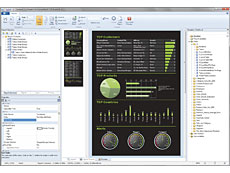






 相关产品
相关产品 授权相关问题
 微信
微信 在线咨询
在线咨询




 渝公网安备
50010702500608号
渝公网安备
50010702500608号

 客服热线
客服热线