提供3000多款全球软件/控件产品
针对软件研发的各个阶段提供专业培训与技术咨询
根据客户需求提供定制化的软件开发服务
全球知名设计软件,显著提升设计质量
打造以经营为中心,实现生产过程透明化管理
帮助企业合理产能分配,提高资源利用率
快速打造数字化生产线,实现全流程追溯
生产过程精准追溯,满足企业合规要求
以六西格玛为理论基础,实现产品质量全数字化管理
通过大屏电子看板,实现车间透明化管理
对设备进行全生命周期管理,提高设备综合利用率
实现设备数据的实时采集与监控
利用数字化技术提升油气勘探的效率和成功率
钻井计划优化、实时监控和风险评估
提供业务洞察与决策支持实现数据驱动决策
原创|使用教程|编辑:龚雪|2016-03-11 12:06:04.000|阅读 1785 次
概述:本教程将带您一步一步了解如何使用Barcode Professional SDK for .NET创建具有条码生成功能的本地RDLC报表。
#慧都22周年庆大促·界面/图表报表/文档/IDE/IOT/测试等千款热门软控件火热促销中>>
相关链接:
Barcode Professional SDK for .NET最新版下载


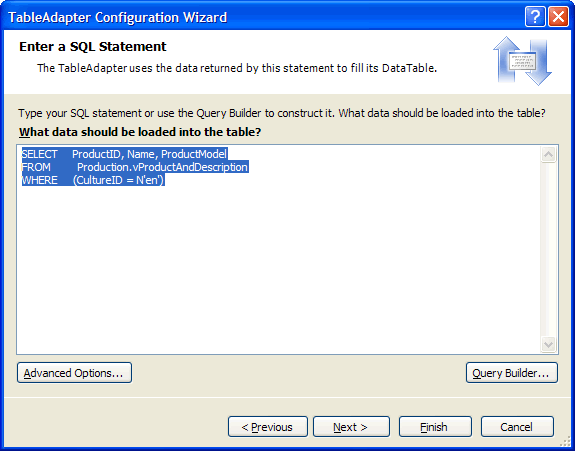
按照向导中的步骤。首先,请创建一个到AdventureWorks SQL Server数据库样本的连接然后选择下一步。之后,选择"Use SQL statements"并点击下一步。输入以下SQL语句:
SELECT ProductID, Name, ProductModel FROM Production.vProductAndDescription WHERE (CultureID = N'en')


VB
private void Form1_Load(object sender, EventArgs e)
{
//Fill the datasource from DB
this.vProductAndDescriptionTableAdapter.Fill(this.AdventureWorks.vProductAndDescription);
//Create an instance of Barcode Professional
Neodynamic.SDK.BarcodeProfessional bcp = new Neodynamic.SDK.BarcodeProfessional();
//Barcode settings
bcp.Symbology = Neodynamic.SDK.Symbology.Code128;
bcp.BarHeight = 0.25f;
//Update DataTable with barcode image
foreach(AdventureWorks.vProductAndDescriptionRow row in this.AdventureWorks.vProductAndDescription.Rows)
{
//Set the value to encode
bcp.Code = row.ProductID.ToString();
//Generate the barcode image and store it into the Barcode Column
row.Barcode = bcp.GetBarcodeImage(System.Drawing.Imaging.ImageFormat.Png);
}
this.reportViewer1.RefreshReport();
}
C#
private void button1_Click(object sender, EventArgs e)
{
//Create an instance of ReportViewer
Microsoft.Reporting.WinForms.ReportViewer viewer = new Microsoft.Reporting.WinForms.ReportViewer();
//Set local report
//NOTE: LocalReportWithBarcode refers to the namespace for the app.
viewer.LocalReport.ReportEmbeddedResource = "LocalReportWithBarcode.Report1.rdlc";
//Generate Data Source...
//Fill the datasource from DB
AdventureWorksTableAdapters.vProductAndDescriptionTableAdapter ta = new AdventureWorksTableAdapters.vProductAndDescriptionTableAdapter();
AdventureWorks.vProductAndDescriptionDataTable dt = new AdventureWorks.vProductAndDescriptionDataTable();
ta.Fill(dt);
//Create an instance of Barcode Professional
Neodynamic.SDK.BarcodeProfessional bcp = new Neodynamic.SDK.BarcodeProfessional();
//Barcode settings
bcp.Symbology = Neodynamic.SDK.Symbology.Code128;
bcp.BarHeight = 0.25f;
//Update DataTable with barcode image
foreach(AdventureWorks.vProductAndDescriptionRow row in dt.Rows)
{
//Set the value to encode
bcp.Code = row.ProductID.ToString();
//Generate the barcode image and store it into the Barcode Column
row.Barcode = bcp.GetBarcodeImage(System.Drawing.Imaging.ImageFormat.Png);
}
//Create Report Data Source
Microsoft.Reporting.WinForms.ReportDataSource rptDataSource = new Microsoft.Reporting.WinForms.ReportDataSource("AdventureWorks_vProductAndDescription", dt);
viewer.LocalReport.DataSources.Add(rptDataSource);
//Export to PDF. Get binary content.
string mimeType;
string encoding;
string fileNameExtension;
string[] streams;
Microsoft.Reporting.WinForms.Warning[] warnings;
byte[] pdfContent = viewer.LocalReport.Render("PDF", null, out mimeType, out encoding, out fileNameExtension, out streams, out warnings);
//Creatr PDF file on disk
string pdfPath = @"C:\temp\reportBarcode.pdf";
System.IO.FileStream pdfFile = new System.IO.FileStream(pdfPath, System.IO.FileMode.Create);
pdfFile.Write(pdfContent, 0, pdfContent.Length);
pdfFile.Close();
//Open PDF file
System.Diagnostics.Process.Start(pdfPath);
}

本文翻译自Neodynamic.com
更多条形码相关产品请点击>>
本站文章除注明转载外,均为本站原创或翻译。欢迎任何形式的转载,但请务必注明出处、不得修改原文相关链接,如果存在内容上的异议请邮件反馈至chenjj@evget.com


在嵌入式系统中,函数往往依赖于外部设备状态或其他模块的返回结果,这使得测试的复杂性显著增加。在实际测试过程中,经常会遇到一个函数多次调用另一个依赖函数,并且需要根据不同的调用顺序返回不同结果的情况。Parasoft C/C++test 作为一款专业的自动化测试工具能够通过桩函数实现多次调用返回不同值,从而完成对复杂逻辑的充分测试。
在现代软件开发过程中,自动化单元测试是确保代码质量与可靠性的关键环节。尤其对于特定框架(如MFC)的代码,测试复杂度显著增加,常因依赖外部资源或交互操作而难以在静默环境中顺利执行。Parasoft C/C++test作为专业的软件测试工具,致力于帮助开发团队高效实施自动化测试,通过其强大的桩函数功能,能够有效模拟依赖组件的行为,从而实现对复杂逻辑的隔离测试。
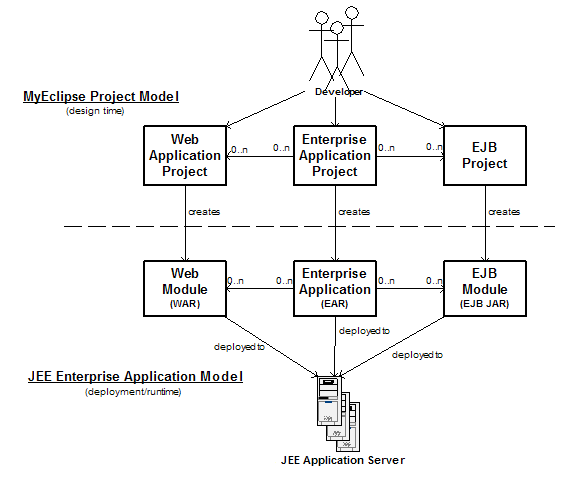
本文将为大家介绍如何在MyEclipse中使用XDoclet开发EJB 2 Session Bean,欢迎下载最新版体验!
如果能将 CSV 自动转换为 PDF ,就能快速生成清晰、美观的报表,既节省手动排版时间,又能保持数据的专业呈现。本文将介绍如何使用 Spire.XLS for Java 实现这一过程——从加载 CSV 到输出高质量 PDF,仅需数行代码即可完成。
服务电话
重庆/ 023-68661681
华东/ 13452821722
华南/ 18100878085
华北/ 17347785263
客户支持
技术支持咨询服务
服务热线:400-700-1020
邮箱:sales@evget.com
关注我们
地址 : 重庆市九龙坡区火炬大道69号6幢
慧都科技 版权所有 Copyright 2003-
2025 渝ICP备12000582号-13 
渝公网安备
50010702500608号
首页