有时候我们需要以邮件形式发送附有条形码的门票、实施通讯、请柬。那么面对这样的情况我们该怎么处理呢?今天我们将介绍如何用Barcode Professional生成及发送有条形码的HTML电子邮件。
【Barcode Professional下载】
参考步骤:
- 打开ASP.NET 编辑器(Microsoft Visual Studio 2005, Visual Web Developer Express Edition 或者Microsoft Expression Web)创建ASP.NET网站,添加一个空白页。
- 添加引用 Neodynamic.WebControls.BarcodeProfessional.dll 组件。
- 创建一个WebForm,像下图一样。添加一个文本框和一个按钮控制。
- 在WebForm类文件里写入下面的方法。这方法叫GetBarcodeImage,它可生成编码随机值的条码图像,能够嵌入到HTML邮件里。
VB
Private Function GetBarcodeImage() As System.IO.MemoryStream
 'Create an instance of BarcodeProfessional class
 Dim bcp As New Neodynamic.WebControls.BarcodeProfessional.BarcodeProfessional()

 'Set barcode settings...
 'Code 128 symbology
 bcp.Symbology = Neodynamic.WebControls.BarcodeProfessional.Symbology.Code128
 'Set a fictitious value to encode
 bcp.Code = Guid.NewGuid().ToString().Replace("-", "").Substring(0, 20).ToUpper()

 'Return barcode stream
 Return New System.IO.MemoryStream(bcp.GetBarcodeImage(System.Drawing.Imaging.ImageFormat.Png))
 End Function
C#
private System.IO.MemoryStream GetBarcodeImage()
 {
 //Create an instance of BarcodeProfessional class
 Neodynamic.WebControls.BarcodeProfessional.BarcodeProfessional bcp = new Neodynamic.WebControls.BarcodeProfessional.BarcodeProfessional();

 //Set barcode settings...
 //Code 128 symbology
 bcp.Symbology = Neodynamic.WebControls.BarcodeProfessional.Symbology.Code128;
 //Set a fictitious value to encode
 bcp.Code = Guid.NewGuid().ToString().Replace("-","").Substring(0,20).ToUpper();

 //Return barcode stream
 return new System.IO.MemoryStream(bcp.GetBarcodeImage(System.Drawing.Imaging.ImageFormat.Png));
}- 在按钮点击事件过程中,用System.Net.Mail 类嵌入到用上文方法生成的条码图像。
VB
Protected Sub Button1_Click(ByVal sender As Object, ByVal e As System.EventArgs) Handles Button1.Click
'Create the mail message
Dim mail As New System.Net.Mail.MailMessage()

'Set the email addresses
mail.From = New System.Net.Mail.MailAddress("me@mycompany.com")
mail.To.Add(Me.TextBox1.Text)

'Set the subject
mail.Subject = "John Doe in Concert - Barcode Ticket"

'Create the Html part.
'To embed the barcode image, we need to use the prefix cid in the img src attribute.
'The cid value will map to the Content-Id of a Linked resource.
'Example: <img src="cid:barcodeticket"> will map to a LinkedResource with a ContentId of barcodeticket

Dim htmlContent1 As String = "<table border="" 1""="" bordercolor="" #000000""="" cellpadding="" 5""="" cellspacing="" 0""="" style="" vertical-align:="" middle;="" width:="" 300px;="" text-align:="" center""=""><tbody><tr><td bgcolor="" #ff6633""="" colspan="" 2""=""><span style="" font-size:="" 10pt;="" color:="" #ffffff;="" font-family:="" arial""=""><b>NEOMIX</b></span></td></tr><tr><td colspan="" 2""=""><span style="" font-family:="" arial="" black""="">ADMIT ONE</span></td></tr><tr><td bgcolor="" #ff6633""="" colspan="" 2""=""><span style="" color:="" #ffffff;="" font-family:="" arial""="">NEO STADIUM</span></td></tr><tr><td colspan="" 2""=""><span style="" font-size:="" 10pt;="" font-family:="" arial""=""><b>GENERAL ADMISSION</b></span></td></tr><tr><td bgcolor="" #ff6633""="" colspan="" 2""=""> </td></tr><tr><td colspan="" 2""=""><span style="" font-size:="" 22pt;="" font-family:="" arial""=""><b>John Doe in Concert</b></span></td></tr><tr><td colspan="" 2""="">"
Dim htmlContent2 As String = "<img src="cid:barcodeticket">"
Dim htmlContent3 As String = "</td></tr><tr><td style="" width:="" 100px""=""><span style="" font-family:="" arial="" black""="">May<br><span style="" font-size:="" 24pt""="">19</span><br>2007</span></td><td style="" width:="" 100px""=""><span style="" font-family:="" arial="" black""="">SATURDAY<br>8:00 PM</span></td></tr><tr><td bgcolor="" #ff6633""="" colspan="" 2""=""><span style="" color:="" #ffffff;="" font-family:="" arial="" black""="">$ 98.00</span></td></tr></tbody></table>"

Dim htmlView As System.Net.Mail.AlternateView = System.Net.Mail.AlternateView.CreateAlternateViewFromString(htmlContent1 + htmlContent2 + htmlContent3, Nothing, "text/html")

'Create the LinkedResource (embedded barcode image)
Dim barcode As New System.Net.Mail.LinkedResource(Me.GetBarcodeImage(), "image/png")
barcode.ContentId = "barcodeticket"
'Add the LinkedResource to the view
htmlView.LinkedResources.Add(barcode)

'Add the view
mail.AlternateViews.Add(htmlView)

'specify the mail server address
Dim smtp As New System.Net.Mail.SmtpClient("127.0.0.1")
'send the message
smtp.Send(mail)
End Sub
C#
protected void Button1_Click(object sender, EventArgs e)
{
//Create the mail message
System.Net.Mail.MailMessage mail = new System.Net.Mail.MailMessage();

//Set the email addresses
mail.From = new System.Net.Mail.MailAddress("me@mycompany.com");
mail.To.Add(this.TextBox1.Text);

//Set the subject
mail.Subject = "John Doe in Concert - Barcode Ticket";

//Create the Html part.
//To embed the barcode image, we need to use the prefix 'cid' in the img src attribute.
//The cid value will map to the Content-Id of a Linked resource.
//Example: <img src="cid:barcodeticket"> will map to a LinkedResource with a ContentId of 'barcodeticket'

string htmlContent1 = "<table border="\"1\"" bordercolor="\"#000000\"" cellpadding="\"5\"" cellspacing="\"0\"" style="\"vertical-align:" middle;="" width:="" 300px;="" text-align:="" center\"=""><tbody><tr><td bgcolor="\"#ff6633\"" colspan="\"2\""><span style="\"font-size:" 10pt;="" color:="" #ffffff;="" font-family:="" arial\"=""><b>NEOMIX</b></span></td></tr><tr><td colspan="\"2\""><span style="\"font-family:" arial="" black\"="">ADMIT ONE</span></td></tr><tr><td bgcolor="\"#ff6633\"" colspan="\"2\""><span style="\"color:" #ffffff;="" font-family:="" arial\"="">NEO STADIUM</span></td></tr><tr><td colspan="\"2\""><span style="\"font-size:" 10pt;="" font-family:="" arial\"=""><b>GENERAL ADMISSION</b></span></td></tr><tr><td bgcolor="\"#ff6633\"" colspan="\"2\""> </td></tr><tr><td colspan="\"2\""><span style="\"font-size:" 22pt;="" font-family:="" arial\"=""><b>John Doe in Concert</b></span></td></tr><tr><td colspan="\"2\"">";
string htmlContent2 = "<img src="cid:barcodeticket">";
string htmlContent3 = "</td></tr><tr><td style="\"width:" 100px\"=""><span style="\"font-family:" arial="" black\"="">May<br><span style="\"font-size:" 24pt\"="">19</span><br>2007</span></td><td style="\"width:" 100px\"=""><span style="\"font-family:" arial="" black\"="">SATURDAY<br>8:00 PM</span></td></tr><tr><td bgcolor="\"#ff6633\"" colspan="\"2\""><span style="\"color:" #ffffff;="" font-family:="" arial="" black\"="">$ 98.00</span></td></tr></tbody></table>";

System.Net.Mail.AlternateView htmlView = System.Net.Mail.AlternateView.CreateAlternateViewFromString(htmlContent1 + htmlContent2 + htmlContent3, null, "text/html");

//Create the LinkedResource (embedded barcode image)
System.Net.Mail.LinkedResource barcode = new System.Net.Mail.LinkedResource(this.GetBarcodeImage(), "image/png");
barcode.ContentId = "barcodeticket";
//Add the LinkedResource to the view
htmlView.LinkedResources.Add(barcode);

//Add the view
mail.AlternateViews.Add(htmlView);

//specify the mail server address
System.Net.Mail.SmtpClient smtp = new System.Net.Mail.SmtpClient("127.0.0.1");
//send the message
smtp.Send(mail);
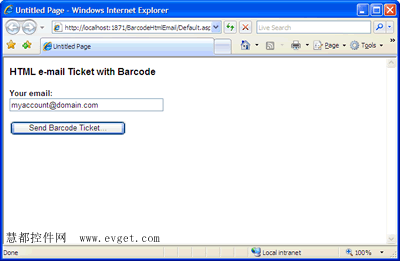
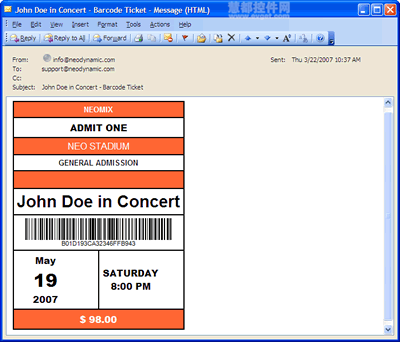
}- 完成!建立项目进行测试(上面代码中需指定一个有效的电子邮件账户和SMTP服务器),会得到下图。
当你指定有效地址并点击Send Barcode Ticket后,你将收到上文附有条码的HTML邮件
本文译自neodynamic
标签:
.NETHTMLASP.NET条码生成条码识别条码打印
本站文章除注明转载外,均为本站原创或翻译。欢迎任何形式的转载,但请务必注明出处、不得修改原文相关链接,如果存在内容上的异议请邮件反馈至chenjj@evget.com


 首页
首页 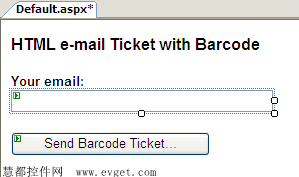













 29次
29次
 相关产品
相关产品 最新文章
最新文章 
 相关文章
相关文章 
 微信
微信 在线咨询
在线咨询




 渝公网安备
50010702500608号
渝公网安备
50010702500608号

 客服热线
客服热线